Jetson AGX Orin Developer Kit with JetPack 6.2.x
Instruction
TechNexion Embedded Vision Solutions provide embedded system developers access to high-performance, industrial-grade camera solutions to accelerate their time to market for embedded vision projects.
Supported Platforms
| Platform | Supported JetPack | Installer Selection | GMSL2 Adaptor |
|---|---|---|---|
| Jetson AGX Orin Developer Kit | JetPack 6.2, 6.2.1, 6.2.2 | Jetson AGX Orin | VL-GM2-AGX-8CAM |
Supported Camera Modules
| Camera Series | Products |
|---|---|
| VLS-GM2 | VLS-GM2-AR0144 VLS-GM2-AR0145 VLS-GM2-AR0234 VLS-GM2-AR0235 VLS-GM2-AR0246 VLS-GM2-AR0521 VLS-GM2-AR0522 VLS-GM2-AR0544 VLS-GM2-AR0821 VLS-GM2-AR0822 VLS-GM2-AR0830 VLS-GM2-AR1335 VLS-GM2-AR2020 |
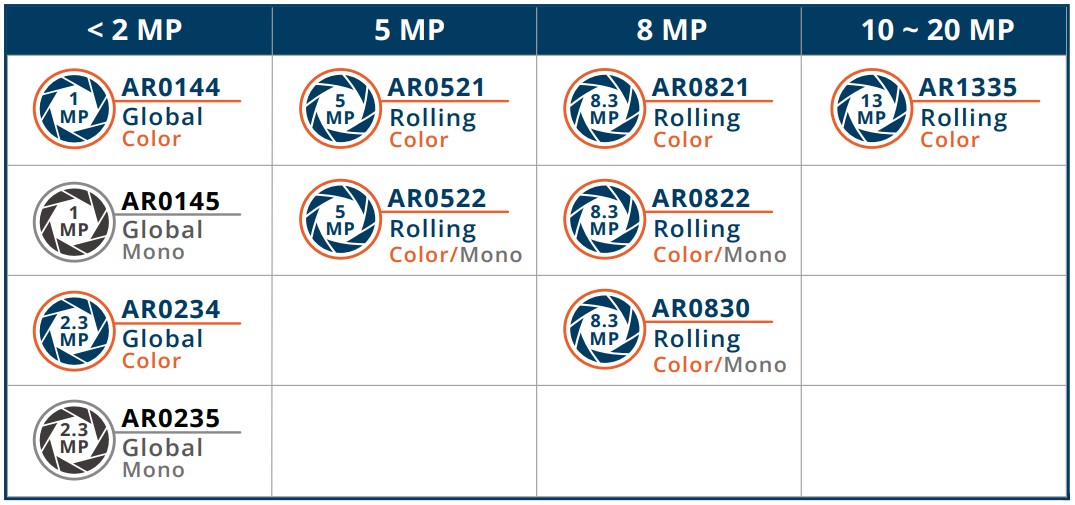
More Camera Products Details...
TEVS/TEVM MIPI CSI-2 cameras are not supported on Jetson AGX Orin Developer Kit in this section. For MIPI CSI-2 cameras, use the Jetson Orin Nano MIPI CSI-2 JetPack 6.x guide.
Install TN Camera on Jetson AGX Orin Developer Kit
Adaptor for NVIDIA Jetson AGX Orin Developer Kit
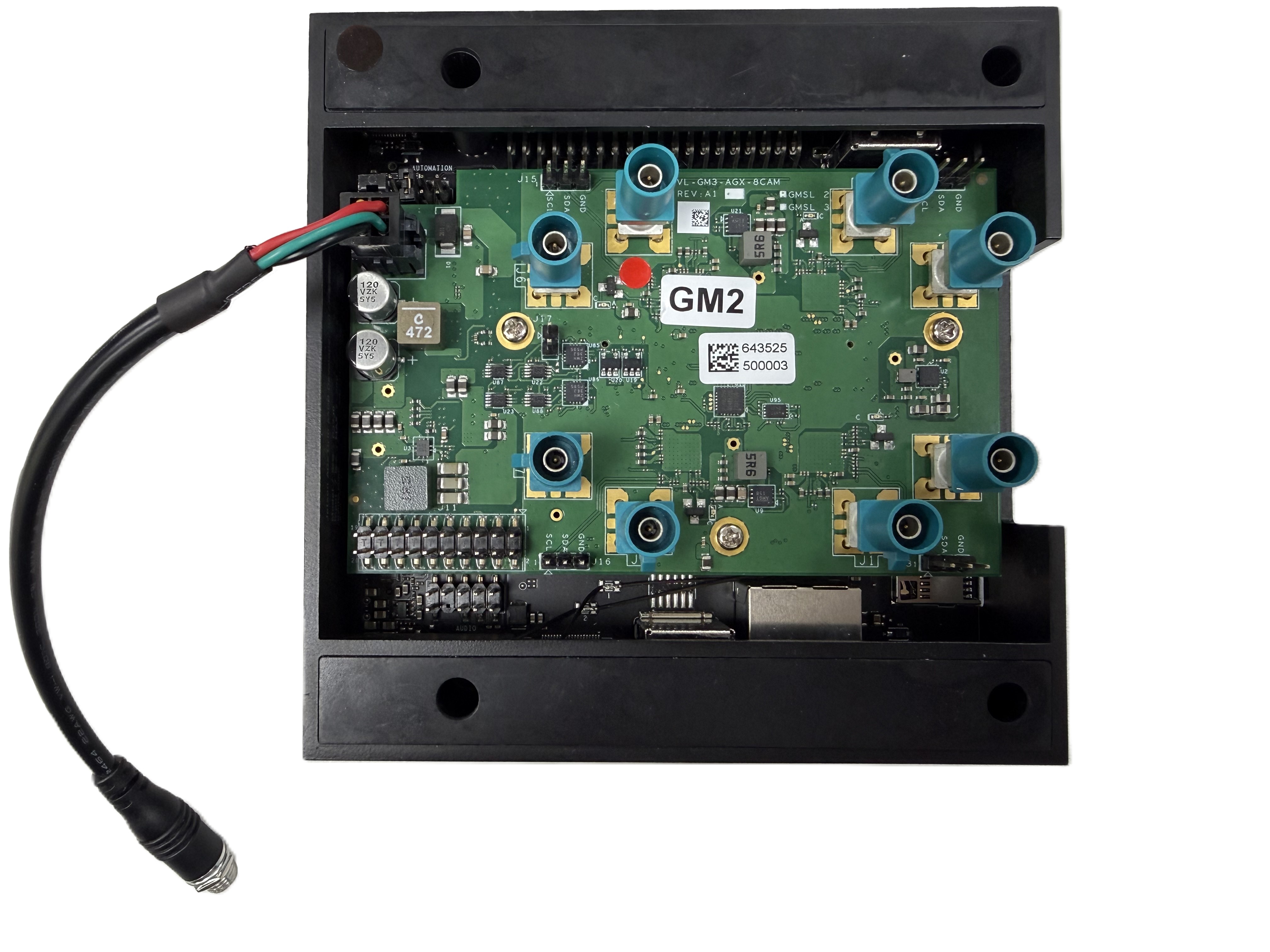
Use the VL-GM2-AGX-8CAM adaptor for VLS-GM2 cameras on Jetson AGX Orin Developer Kit. For adaptor pinout and power details, see VL-GM2-AGX-8CAM.
Method 1 - Using TechNexion pre-built modules
We recommend setting up the Jetson AGX Orin Developer Kit with a matching NVIDIA JetPack 6.2.x image first. After that, you can follow the method below to install TechNexion camera drivers.
- Download pre-built modules.
- JetPack 6.2
- JetPack 6.2.1
- JetPack 6.2.2
wget https://download.technexion.com/demo_software/EVK/NVIDIA/OrinNano/pre-built-modules/latest/JP62/tn_camera_modules_jp62.tar.gz
wget https://download.technexion.com/demo_software/EVK/NVIDIA/OrinNano/pre-built-modules/latest/JP621/tn_camera_modules_jp621.tar.gz
wget https://download.technexion.com/demo_software/EVK/NVIDIA/OrinNano/pre-built-modules/latest/JP622/tn_camera_modules_jp622.tar.gz
The driver package path currently uses OrinNano naming, but the JetPack 6.2.x installer lets you select Jetson AGX Orin.
-
Uncompress the modules.
tar -xf tn_camera_modules_<jp_ver>.tar.gz -
Run the installation script.
cd tn_camera_modules_<l4t_ver>_<release_time>/
sudo ./tn_install.sh -
Select the Jetson AGX Orin platform and VLS-GM2 module.
$ sudo ./tn_install.sh
****** TechNexion Camera Driver Installation ******
This installer updates TechNexion camera drivers, camera DTBOs,
and boot entries for NVIDIA Jetson Development Kits.
Back up your image before continuing.
Continue? [Y/n] Y
Target platform:
  [1] Jetson Orin Nano
  [2] Jetson AGX Orin
Select platform [1-2] (default: 1): 2
Reboot after installation? [y/N] n
Installing OrinNano JP62
Selected platform: Jetson AGX Orin
Selected module: VLS-GM2
Installation summary:
  Kernel: 5.15.148-tegra
  Modules installed: 5
  Boot files installed: 12
  Default boot entry: vls-gm2
  Camera overlay: /boot/tegra234-p3737-camera-vls-gm2-overlay.dtbo
  Camera boot entries: 5
Finish Camera Driver Installation.
Reboot the device when the user is ready.
Reboot the device after installation.
Method 2 - Using TechNexion disk image
wget https://download.technexion.com/demo_software/EVK/NVIDIA/AGXOrin/VL-GM2-AGX-8CAM/DiskImage/tn-jp621-agx-orin-vls-gm2-sd-image.zip
unzip tn-jp621-agx-orin-vls-gm2-sd-image.zip -d ./
sudo dd if=tn_jp621_vls-gm2_sd_disk.img of=${device} bs=1M status=progress oflag=direct
Method 3 - Build drivers from source code
Please follow the JetPack 6.x build guide to build camera driver modules.
Bring up Camera
TechNexion VizionViewer
Gstreamer
If you succeed in initialing the camera, you can follow the steps to open the camera.
-
Check the supported resolutions:
$ gst-device-monitor-1.0 Video/Source
Probing devices...

Device found:

        name  : vi-output, tevs 9-003d
        class : Video/Source
        caps  : video/x-raw, format=UYVY, width=640, height=480, framerate=60/1
                video/x-raw, format=UYVY, width=1280, height=720, framerate=60/1
                video/x-raw, format=UYVY, width=1280, height=800, framerate=60/1
                video/x-raw, format=NV16, width=640, height=480, framerate=60/1
                video/x-raw, format=NV16, width=1280, height=720, framerate=60/1
                video/x-raw, format=NV16, width=1280, height=800, framerate=60/1
                video/x-raw, format=UYVY, width=640, height=480, framerate=60/1
                video/x-raw, format=UYVY, width=1280, height=720, framerate=60/1
                video/x-raw, format=UYVY, width=1280, height=800, framerate=60/1
        properties:
                object.path = v4l2:/dev/video0
                device.api = v4l2
                media.class = Video/Source
                api.v4l2.path = /dev/video0
                api.v4l2.cap.driver = tegra-video
                api.v4l2.cap.card = "vi-output\,\ tevs\ 9-003d"
                api.v4l2.cap.bus_info = platform:tegra-capture-vi:0
                api.v4l2.cap.version = 5.15.148
                api.v4l2.cap.capabilities = 84200001
                api.v4l2.cap.device-caps = 04200001
                device.id = 33
                node.name = v4l2_input.platform-tegra-capture-vi
                node.description = "vi-output\,\ tevs\ 9-003d"
                factory.name = api.v4l2.source
                node.pause-on-idle = false
                factory.id = 10
                client.id = 32
                clock.quantum-limit = 8192
                media.role = Camera
                node.driver = true
                object.id = 34
                object.serial = 34
        gst-launch-1.0 pipewiresrc path=34 ! ...

... -
Use the Gstreamer pipeline to launch a 1280x720 resolution camera (/dev/video0) via the CPU:
$ DISPLAY=:0 gst-launch-1.0 v4l2src device=/dev/video0 ! \
"video/x-raw, format=UYVY, width=1280, height=720" ! xvimagesink sync=false -
Use the Gstreamer pipeline to launch a 1280x720 resolution camera (/dev/video0) via the GPU:
$ DISPLAY=:0 gst-launch-1.0 nvv4l2camerasrc device=/dev/video0 ! \
"video/x-raw(memory:NVMM), format=UYVY, width=1280, height=720" ! \
nvvidconv ! nv3dsink sync=false
Troubleshooting
Cannot Find Cameras
If you cannot bring up the cameras, you can check if the video device does exist.
$ ls /dev/video*  # List all video devices
/dev/video0  /dev/video1
If you cannot see the devices, you should check if the drivers have been probed.
Occur Error: Could not get EGL display connection
If you occurred the errors nvbufsurftransform: Could not get EGL display connection by rununing the Gstreamer command, you can modify the parameter 'DISPLAY' by the command:
# Check and Set environment parameter for 'DISPLAY'
$ export DISPLAY=$(w| tr -s ' '| cut -d ' ' -f 3 | grep :)
# Run Gstreamer pipeline
$ gst-launch-1.0 v4l2src device=/dev/video0 ! \
"video/x-raw, format=UYVY, width=1280, height=720" ! xvimagesink sync=false