NXP IMX95LPD5EVK-19CM board Camera Usage Guide
🚀 Introduction
This article guides you how to get started using TechNexion camera modules on NXP IMX95LPD5EVK-19CM board.
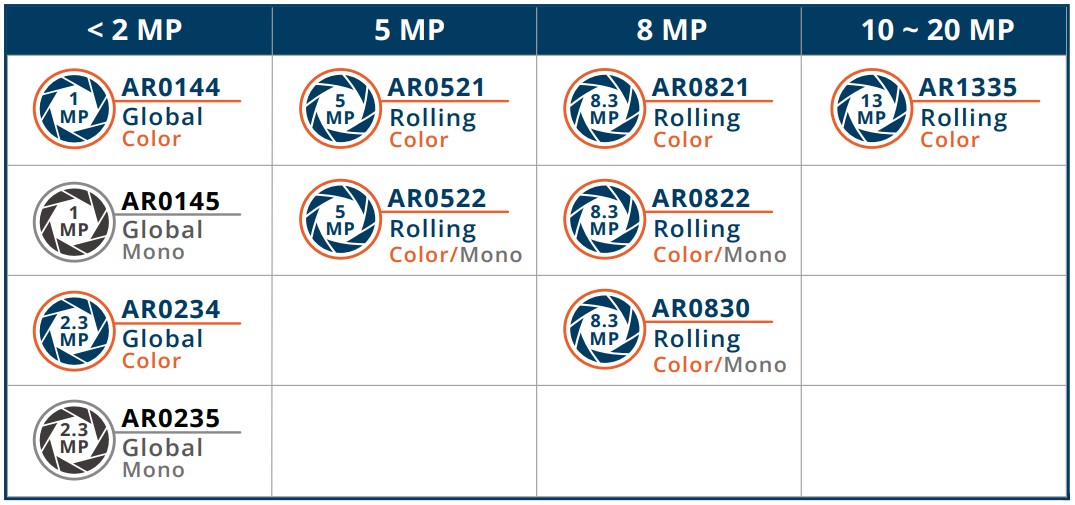
📸 Supported Camera Modules
- TEVS Series
- TEVM Series
| Camera Series | Products |
|---|---|
| TEVS | TEVS-AR0144 TEVS-AR0145 TEVS-AR0234 TEVS-AR0235 TEVS-AR0246 TEVS-AR0521 TEVS-AR0522 TEVS-AR0544 TEVS-AR0821 TEVS-AR0822 TEVS-AR0830 TEVS-AR1335 TEVS-AR2020 |
| Camera Series | Products |
|---|---|
| TEVM | TEVM-AR0144 TEVM-AR0145 TEVM-AR0234 TEVM-AR0235 TEVM-AR0246 TEVM-AR0521 TEVM-AR0522 TEVM-AR0544 TEVM-AR0821 TEVM-AR0822 TEVM-AR0830 TEVM-AR1335 TEVM-AR2020 |
🔧 Hardware Setup Instructions
Connect the Adapter Board and Camera Cable
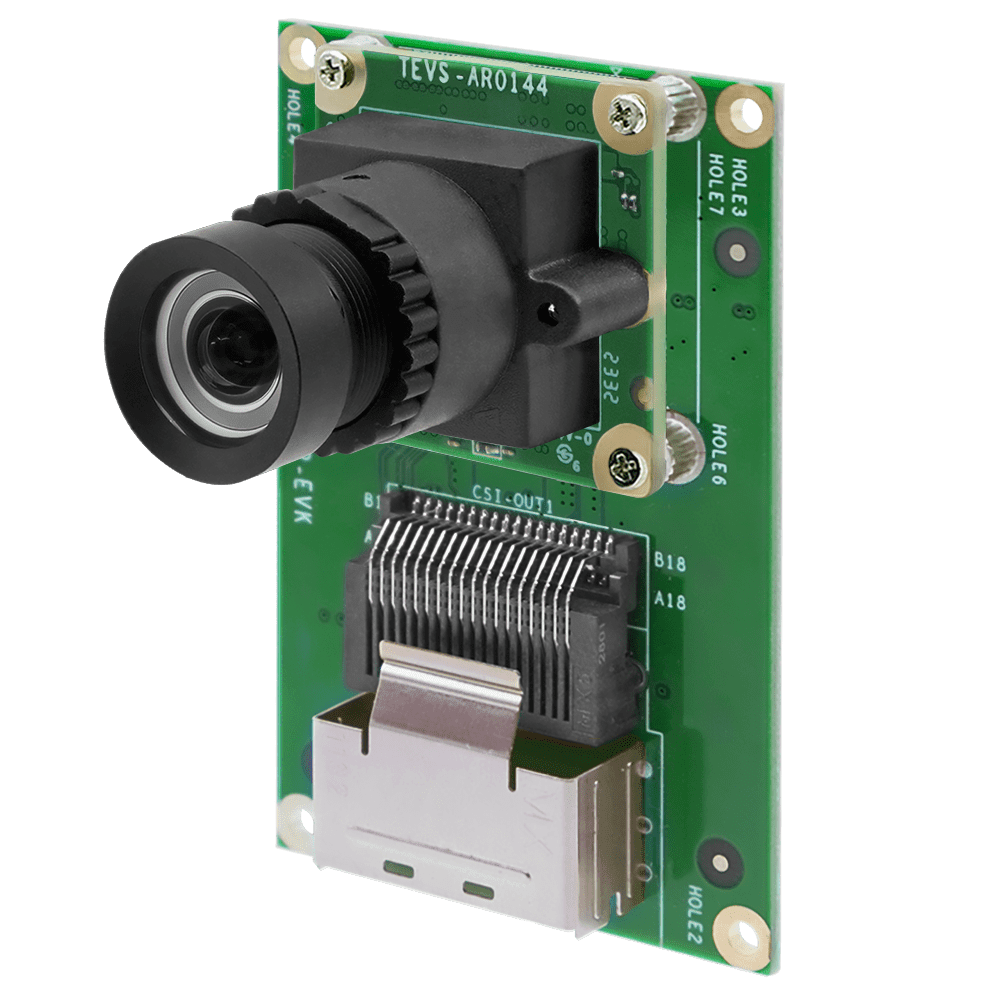
To set up TechNexion camera, connect the adapter board and camera cable to the MIPI CSI port on the EVK board.
🧰 Camera Installation Instructions
We provide some methods to install camera driver and device tree blobs. Depending on your needs, you can choose the most suitable method. If you are new to this, we recommend starting with Method 1. If you want to customized your Yocto project or Linux kernel, you can try Method 2 or Method 3. If you have a custom Linux kernel and device tree, you can try Method 4.
Method 1 - Using TechNexion Pre-built image
Prepare Yocto demo image for testing TechNexion camera
To test TechNexion TEVS Series cameras, you need a demo image that includes the required Device Tree Blobs (DTBs) and camera drivers.
Download and Select the Correct Image for Your EVK
Prebuilt demo images can be available for download via TechNexion's server.
Download Link:
🔗 Download Prebuilt Image for IMX95LPD5EVK-19CM)
Flashing the Image
You can flash the image to an SD Card using the following methods:
Make sure your EVK board is set to boot from SD card.
Refer to the official NXP guide 🔗 i.MX 95 LPD5 EVK Quick Start Guide
- For Windows Users
- For Linux Users
Use balenaEtcher to write the image to your SD card:
🔗 
Use bmap-tools for a fast and reliable flashing process to the SD card:
sudo apt-get update
sudo apt-get install bmap-tools
Method 2 - Build Yocto image with TechNexion BSP
TechNexion supports building a Yocto-based Linux image tailored for camera modules using the following kernel and branch.
If you are using prebuilt demo image, you can skip this section. Please refer to 📸 Camera Testing Instructions section for camera testing steps.
Supported Linux Kernel
| Linux Kernel Version | Yocto Branch |
|---|---|
| 6.12.49 | tn-imx_6.12.49_2.2.0-stable |
Source and Build Instructions
🔗 Fetch Yocto source
📖 Build Yocto (Instructions for IMX95LPD5EVK-19CM)
Method 3 - Build Linux kernel with TechNexion source code
Clone the Kernel Source
Fetch and compile Linux kernel.
- Host OS: Ubuntu 22.04
- Toolchain:
aarch64-linux-gnu-gcc-11
Install cross-compile & dependency tools.
$ sudo apt update
$ sudo apt install -y gcc-aarch64-linux-gnu libncurses-dev libssl-dev bison flex git make
Clone the Kernel Source
$ git clone https://github.com/TechNexion/linux-tn-imx.git -b tn-imx_6.12.49_2.2.0-stable
Set cross-compile environment & the kernel config.
$ export ARCH=arm64
$ export CROSS_COMPILE=/usr/bin/aarch64-linux-gnu-
$ cd linux-tn-imx
~/linux-tn-imx$ make imx_v8_defconfig
Compile the kernel & module driver.
# compile kernel
~/linux-tn-imx$ make -j$(nproc)
# create kernel module folder
~/linux-tn-imx$ mkdir -p ./modules
# compile module driver
~/linux-tn-imx$ rm -rf ./modules/*
~/linux-tn-imx$ make INSTALL_MOD_PATH=./modules modules_install
Change kernel Image, DTB & modules.
~/linux-tn-imx/$ cp arch/arm64/boot/Image  <mount_folder>/boot/Image
~/linux-tn-imx/$ cp arch/arm64/boot/dts/freescale/imx95-19x19-evk-tevs-tev-nxp.dts  <mount_folder>/boot/
~/linux-tn-imx/$ sudo cp -r ./modules/lib/modules/*  <mount_folder>/root/lib/modules/
Method 4 - Build custom Linux kernel with camera driver
-
Download the camera driver and device tree blobs.
$ git clone https://github.com/TechNexion-Vision/nxp_evk_camera.git -b tn-imx_6.12.49_2.2.0-stable -
Copy to your kernel source code.
$ cd nxp_evk_camera/
~/nxp_evk_camera$ cp -r driver/media/i2c/tevs/ <fetch_kernel_folder>/driver/media/i2c/

~/nxp_evk_camera$ cp arch/arm64/boot/dts/freescale/imx95-19x19-evk-tevs-tev-nxp.dts<fetch_kernel_folder>/arch/arm64/boot/dts/freescale/ -
Modify makefile to add driver.
$ cd <fetch_kernel_folder>/driver/media/i2c/
~/<fetch_kernel_folder>/driver/media/i2c/$ vi Makefile
Add this line in Makefile.
obj-$(CONFIG_VIDEO_TEVS) += tevs/
you can refer to linux-tn-imx/drivers/media/i2c/Makefile
-
Modify Kconfig to add camera config.
~/<fetch_kernel_folder>/driver/media/i2c/$ vi KconfigAdd this part under "Camera sensor devices" menu in Kconfig.
config VIDEO_TEVS
  tristate "TechNexion TEVS sensor support"
  depends on OF
  depends on GPIOLIB && I2C && VIDEO_V4L2_SUBDEV_API
  depends on MEDIA_CAMERA_SUPPORT
  select V4L2_FWNODE
  default y
  help
    This is a Video4Linux2 sensor driver for the TechNexion
    TEVS camera sensor with a MIPI CSI-2 interface.
you can refer to linux-tn-imx/drivers/media/i2c/Kconfig
-
Modify makefile to add device tree.
$ cd <fetch_kernel_folder>/arch/arm64/boot/dts/freescale/
~/<fatch_kernel_folder>/arch/arm64/boot/dts/freescale/$ vi Makefile
Add this line in Makefile.
imx95-19x19-evk-tevs-dtbs := imx95-19x19-evk.dtb imx95-19x19-evk-tevs-tev-nxp.dtbo
dtb-$(CONFIG_ARCH_MXC) += imx95-19x19-evk-tevs.dtb
you can refer to linux-tn-imx/arch/arm64/boot/dts/freescale/Makefile
-
Compile the kernel & module driver.
Finally, you can start compiling your new Image files, then copy and replace the Image files in the SD card.
📸 Camera Testing Instructions
Specify Camera DTBO in U-Boot
-
Connect the debug console cable to the baseboard (via USB-C).
-
Power on the board and interrupt the boot process. Keep pressing
Enterwhen the following message appears:Hit any key to stop autoboot: -
Specify the appropriate device tree for your camera using the
fdtfileenvironment variable in U-Boot:
u-boot=> setenv fdtfile imx95-19x19-evk-adv7535-tevs.dtb
- Save and continue the boot process:
u-boot=> saveenv
u-boot=> boot
Setup the media controller before camera streaming
To verify that the camera has been properly connected and linked, use the media-ctl command:
$ media-ctl -p
Get the media controller information as follows.
Media controller API version 6.12.49

Media device information
------------------------
driver          mxc-isi
model           FSL Capture Media Device
serial
bus info        platform:4ad50000.isi
hw revision     0x0
driver version  6.12.49

Device topology
- entity 1: crossbar (13 pads, 10 links, 8 routes)
            type V4L2 subdev subtype Unknown flags 0
            device node name /dev/v4l-subdev0
        routes:
                2/0 -> 5/0 [ACTIVE]
                2/0 -> 6/0 [INACTIVE]
                2/0 -> 7/0 [INACTIVE]
                2/0 -> 8/0 [INACTIVE]
                2/0 -> 9/0 [INACTIVE]
                2/0 -> 10/0 [INACTIVE]
                2/0 -> 11/0 [INACTIVE]
                2/0 -> 12/0 [INACTIVE]
        pad0: SINK,MUST_CONNECT
        pad1: SINK,MUST_CONNECT
        pad2: SINK,MUST_CONNECT
                [stream:0 fmt:UYVY8_1X16/1280x720 field:none colorspace:srgb xfer:srgb ycbcr:601]
                <- "4ac10000.syscon:formatter@20":1 [ENABLED,IMMUTABLE]
        pad3: SINK,MUST_CONNECT
        pad4: SINK,MUST_CONNECT
                <- "mxc_isi.output":0 [ENABLED,IMMUTABLE]
        pad5: SOURCE
                [stream:0 fmt:UYVY8_1X16/1280x720 field:none colorspace:srgb xfer:srgb ycbcr:601]
                -> "mxc_isi.0":0 [ENABLED,IMMUTABLE]
        pad6: SOURCE
                -> "mxc_isi.1":0 [ENABLED,IMMUTABLE]
        pad7: SOURCE
                -> "mxc_isi.2":0 [ENABLED,IMMUTABLE]
        pad8: SOURCE
                -> "mxc_isi.3":0 [ENABLED,IMMUTABLE]
        pad9: SOURCE
                -> "mxc_isi.4":0 [ENABLED,IMMUTABLE]
        pad10: SOURCE
                -> "mxc_isi.5":0 [ENABLED,IMMUTABLE]
        pad11: SOURCE
                -> "mxc_isi.6":0 [ENABLED,IMMUTABLE]
        pad12: SOURCE
                -> "mxc_isi.7":0 [ENABLED,IMMUTABLE]

- entity 15: mxc_isi.0 (2 pads, 2 links, 0 routes)
             type V4L2 subdev subtype Unknown flags 0
             device node name /dev/v4l-subdev1
        pad0: SINK
                [stream:0 fmt:UYVY8_1X16/1280x720 field:none colorspace:srgb xfer:srgb ycbcr:601
                 compose.bounds:(0,0)/1280x720
                 compose:(0,0)/1280x720]
                <- "crossbar":5 [ENABLED,IMMUTABLE]
        pad1: SOURCE
                [stream:0 fmt:YUV8_1X24/1280x720 field:none colorspace:jpeg xfer:srgb ycbcr:601 quantization:full-range
                 crop.bounds:(0,0)/1280x720
                 crop:(0,0)/1280x720]
                -> "mxc_isi.0.capture":0 [ENABLED,IMMUTABLE]

- entity 18: mxc_isi.0.capture (1 pad, 1 link)
             type Node subtype V4L flags 0
             device node name /dev/video0
        pad0: SINK
                <- "mxc_isi.0":1 [ENABLED,IMMUTABLE]

- entity 26: mxc_isi.1 (2 pads, 2 links, 0 routes)
             type V4L2 subdev subtype Unknown flags 0
             device node name /dev/v4l-subdev2
        pad0: SINK
                [stream:0 fmt:UYVY8_1X16/1920x1080 field:none colorspace:jpeg xfer:srgb ycbcr:601 quantization:full-range
                 compose.bounds:(0,0)/1920x1080
                 compose:(0,0)/1920x1080]
                <- "crossbar":6 [ENABLED,IMMUTABLE]
        pad1: SOURCE
                [stream:0 fmt:YUV8_1X24/1920x1080 field:none colorspace:jpeg xfer:srgb ycbcr:601 quantization:full-range
                 crop.bounds:(0,0)/1920x1080
                 crop:(0,0)/1920x1080]
                -> "mxc_isi.1.capture":0 [ENABLED,IMMUTABLE]

- entity 29: mxc_isi.1.capture (1 pad, 1 link)
             type Node subtype V4L flags 0
             device node name /dev/video1
        pad0: SINK
                <- "mxc_isi.1":1 [ENABLED,IMMUTABLE]

- entity 37: mxc_isi.2 (2 pads, 2 links, 0 routes)
             type V4L2 subdev subtype Unknown flags 0
             device node name /dev/v4l-subdev3
        pad0: SINK
                [stream:0 fmt:UYVY8_1X16/1920x1080 field:none colorspace:jpeg xfer:srgb ycbcr:601 quantization:full-range
                 compose.bounds:(0,0)/1920x1080
                 compose:(0,0)/1920x1080]
                <- "crossbar":7 [ENABLED,IMMUTABLE]
        pad1: SOURCE
                [stream:0 fmt:YUV8_1X24/1920x1080 field:none colorspace:jpeg xfer:srgb ycbcr:601 quantization:full-range
                 crop.bounds:(0,0)/1920x1080
                 crop:(0,0)/1920x1080]
                -> "mxc_isi.2.capture":0 [ENABLED,IMMUTABLE]

- entity 40: mxc_isi.2.capture (1 pad, 1 link)
             type Node subtype V4L flags 0
             device node name /dev/video2
        pad0: SINK
                <- "mxc_isi.2":1 [ENABLED,IMMUTABLE]

- entity 48: mxc_isi.3 (2 pads, 2 links, 0 routes)
             type V4L2 subdev subtype Unknown flags 0
             device node name /dev/v4l-subdev4
        pad0: SINK
                [stream:0 fmt:UYVY8_1X16/1920x1080 field:none colorspace:jpeg xfer:srgb ycbcr:601 quantization:full-range
                 compose.bounds:(0,0)/1920x1080
                 compose:(0,0)/1920x1080]
                <- "crossbar":8 [ENABLED,IMMUTABLE]
        pad1: SOURCE
                [stream:0 fmt:YUV8_1X24/1920x1080 field:none colorspace:jpeg xfer:srgb ycbcr:601 quantization:full-range
                 crop.bounds:(0,0)/1920x1080
                 crop:(0,0)/1920x1080]
                -> "mxc_isi.3.capture":0 [ENABLED,IMMUTABLE]

- entity 51: mxc_isi.3.capture (1 pad, 1 link)
             type Node subtype V4L flags 0
             device node name /dev/video3
        pad0: SINK
                <- "mxc_isi.3":1 [ENABLED,IMMUTABLE]

- entity 59: mxc_isi.4 (2 pads, 2 links, 0 routes)
             type V4L2 subdev subtype Unknown flags 0
             device node name /dev/v4l-subdev5
        pad0: SINK
                [stream:0 fmt:UYVY8_1X16/1920x1080 field:none colorspace:jpeg xfer:srgb ycbcr:601 quantization:full-range
                 compose.bounds:(0,0)/1920x1080
                 compose:(0,0)/1920x1080]
                <- "crossbar":9 [ENABLED,IMMUTABLE]
        pad1: SOURCE
                [stream:0 fmt:YUV8_1X24/1920x1080 field:none colorspace:jpeg xfer:srgb ycbcr:601 quantization:full-range
                 crop.bounds:(0,0)/1920x1080
                 crop:(0,0)/1920x1080]
                -> "mxc_isi.4.capture":0 [ENABLED,IMMUTABLE]

- entity 62: mxc_isi.4.capture (1 pad, 1 link)
             type Node subtype V4L flags 0
             device node name /dev/video4
        pad0: SINK
                <- "mxc_isi.4":1 [ENABLED,IMMUTABLE]

- entity 70: mxc_isi.5 (2 pads, 2 links, 0 routes)
             type V4L2 subdev subtype Unknown flags 0
             device node name /dev/v4l-subdev6
        pad0: SINK
                [stream:0 fmt:UYVY8_1X16/1920x1080 field:none colorspace:jpeg xfer:srgb ycbcr:601 quantization:full-range
                 compose.bounds:(0,0)/1920x1080
                 compose:(0,0)/1920x1080]
                <- "crossbar":10 [ENABLED,IMMUTABLE]
        pad1: SOURCE
                [stream:0 fmt:YUV8_1X24/1920x1080 field:none colorspace:jpeg xfer:srgb ycbcr:601 quantization:full-range
                 crop.bounds:(0,0)/1920x1080
                 crop:(0,0)/1920x1080]
                -> "mxc_isi.5.capture":0 [ENABLED,IMMUTABLE]

- entity 73: mxc_isi.5.capture (1 pad, 1 link)
             type Node subtype V4L flags 0
             device node name /dev/video5
        pad0: SINK
                <- "mxc_isi.5":1 [ENABLED,IMMUTABLE]

- entity 81: mxc_isi.6 (2 pads, 2 links, 0 routes)
             type V4L2 subdev subtype Unknown flags 0
             device node name /dev/v4l-subdev7
        pad0: SINK
                [stream:0 fmt:UYVY8_1X16/1920x1080 field:none colorspace:jpeg xfer:srgb ycbcr:601 quantization:full-range
                 compose.bounds:(0,0)/1920x1080
                 compose:(0,0)/1920x1080]
                <- "crossbar":11 [ENABLED,IMMUTABLE]
        pad1: SOURCE
                [stream:0 fmt:YUV8_1X24/1920x1080 field:none colorspace:jpeg xfer:srgb ycbcr:601 quantization:full-range
                 crop.bounds:(0,0)/1920x1080
                 crop:(0,0)/1920x1080]
                -> "mxc_isi.6.capture":0 [ENABLED,IMMUTABLE]

- entity 84: mxc_isi.6.capture (1 pad, 1 link)
             type Node subtype V4L flags 0
             device node name /dev/video6
        pad0: SINK
                <- "mxc_isi.6":1 [ENABLED,IMMUTABLE]

- entity 92: mxc_isi.7 (2 pads, 2 links, 0 routes)
             type V4L2 subdev subtype Unknown flags 0
             device node name /dev/v4l-subdev8
        pad0: SINK
                [stream:0 fmt:UYVY8_1X16/1920x1080 field:none colorspace:jpeg xfer:srgb ycbcr:601 quantization:full-range
                 compose.bounds:(0,0)/1920x1080
                 compose:(0,0)/1920x1080]
                <- "crossbar":12 [ENABLED,IMMUTABLE]
        pad1: SOURCE
                [stream:0 fmt:YUV8_1X24/1920x1080 field:none colorspace:jpeg xfer:srgb ycbcr:601 quantization:full-range
                 crop.bounds:(0,0)/1920x1080
                 crop:(0,0)/1920x1080]
                -> "mxc_isi.7.capture":0 [ENABLED,IMMUTABLE]

- entity 95: mxc_isi.7.capture (1 pad, 1 link)
             type Node subtype V4L flags 0
             device node name /dev/video7
        pad0: SINK
                <- "mxc_isi.7":1 [ENABLED,IMMUTABLE]

- entity 103: mxc_isi.output (1 pad, 1 link)
              type Node subtype V4L flags 0
        pad0: SOURCE
                -> "crossbar":4 [ENABLED,IMMUTABLE]

- entity 110: 4ac10000.syscon:formatter@20 (2 pads, 2 links, 1 route)
              type V4L2 subdev subtype Unknown flags 0
              device node name /dev/v4l-subdev9
        routes:
                0/0 -> 1/0 [ACTIVE]
        pad0: SINK
                [stream:0 fmt:UYVY8_1X16/1280x720 field:none colorspace:srgb xfer:srgb ycbcr:601]
                <- "csidev-4ad30000.csi":1 [ENABLED,IMMUTABLE]
        pad1: SOURCE
                [stream:0 fmt:UYVY8_1X16/1280x720 field:none colorspace:srgb xfer:srgb ycbcr:601]
                -> "crossbar":2 [ENABLED,IMMUTABLE]

- entity 115: csidev-4ad30000.csi (2 pads, 2 links, 1 route)
              type V4L2 subdev subtype Unknown flags 0
              device node name /dev/v4l-subdev10
        routes:
                0/0 -> 1/0 [ACTIVE]
        pad0: SINK
                [stream:0 fmt:UYVY8_1X16/1280x720 field:none colorspace:srgb xfer:srgb ycbcr:601 quantization:full-range]
                <- "tevs 2-0048":0 [ENABLED]
        pad1: SOURCE
                [stream:0 fmt:UYVY8_1X16/1280x720 field:none colorspace:srgb xfer:srgb ycbcr:601 quantization:full-range]
                -> "4ac10000.syscon:formatter@20":0 [ENABLED,IMMUTABLE]

- entity 120: tevs 2-0048 (1 pad, 1 link, 0 routes)
              type V4L2 subdev subtype Sensor flags 0
              device node name /dev/v4l-subdev11
        pad0: SOURCE
                [stream:0 fmt:UYVY8_1X16/1280x720@1/60 field:none colorspace:srgb xfer:srgb ycbcr:601 quantization:full-range
                 crop.bounds:(0,0)/1280x720
                 crop:(0,0)/1280x720]
                -> "csidev-4ad30000.csi":0 [ENABLED]
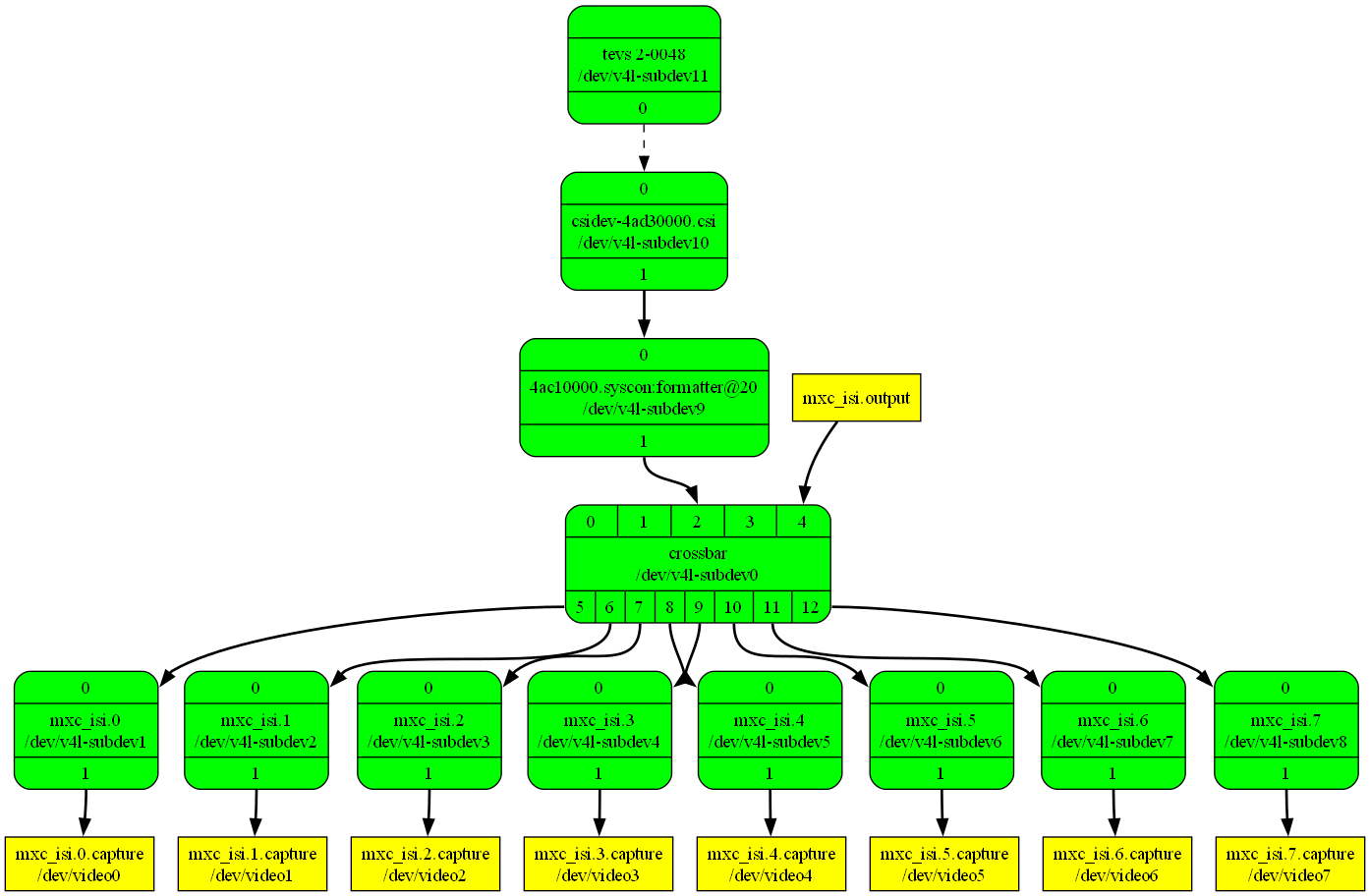
Transfer to image that will be easier to understand.
$ media-ctl --print-dot > graph.dot
$ dot -Tpng graph.dot > graph.png
# if you don't have tool, you need to install it as follows.
# sudo apt-get install -y graphviz
Modify the route through the “crossbar” and only keep the channel of video0.
$ media-ctl -R "'crossbar' [2/0 -> 5/0 [1], 2/0 -> 6/0 [0], 2/0 -> 7/0 [0], 2/0 -> 8/0 [0], 2/0 -> 9/0 [0], 2/0 -> 10/0 [0], 2/0 -> 11/0 [0], 2/0 -> 12/0 [0]]"
Enable the link between TEVS and CSI device.
$ media-ctl -l "'tevs 2-0048':0 -> 'csidev-4ad30000.csi':0 [1]"
Set the X11 display environment variable.
$ export DISPLAY=:0
You can list camera formats, resolutions and frame interval via v4l2 control command.
# formats
$ v4l2-ctl -d /dev/v4l-subdev11 --list-subdev-mbus-codes
ioctl: VIDIOC_SUBDEV_ENUM_MBUS_CODE (pad=0,stream=0)
        0x200f: MEDIA_BUS_FMT_UYVY8_1X16

# resolutions
$ v4l2-ctl -d /dev/v4l-subdev11 --list-subdev-framesize code=0x200f
ioctl: VIDIOC_SUBDEV_ENUM_FRAME_SIZE (pad=0,stream=0)
        Size Range: 640x480 - 640x480
        Size Range: 1280x720 - 1280x720
        Size Range: 1920x1080 - 1920x1080
        Size Range: 2560x1440 - 2560x1440
        Size Range: 3840x2160 - 3840x2160

# frame interval of resolution
$ v4l2-ctl -d /dev/v4l-subdev11 --list-subdev-frameintervals width=640,height=480,code=0x200f
ioctl: VIDIOC_SUBDEV_ENUM_FRAME_INTERVAL (pad=0,stream=0)
        Interval: 0.017s (60.000 fps)
        Interval: 0.033s (30.000 fps)
        Interval: 0.050s (20.000 fps)
        Interval: 0.067s (15.000 fps)
        Interval: 0.100s (10.000 fps)
        Interval: 0.200s (5.000 fps)

$ v4l2-ctl -d /dev/v4l-subdev11 --list-subdev-frameintervals width=1280,height=720,code=0x200f
ioctl: VIDIOC_SUBDEV_ENUM_FRAME_INTERVAL (pad=0,stream=0)
        Interval: 0.017s (60.000 fps)
        Interval: 0.033s (30.000 fps)
        Interval: 0.050s (20.000 fps)
        Interval: 0.067s (15.000 fps)
        Interval: 0.100s (10.000 fps)
        Interval: 0.200s (5.000 fps)

$ v4l2-ctl -d /dev/v4l-subdev11 --list-subdev-frameintervals width=1920,height=1080,code=0x200f
ioctl: VIDIOC_SUBDEV_ENUM_FRAME_INTERVAL (pad=0,stream=0)
        Interval: 0.017s (60.000 fps)
        Interval: 0.033s (30.000 fps)
        Interval: 0.050s (20.000 fps)
        Interval: 0.067s (15.000 fps)
        Interval: 0.100s (10.000 fps)
        Interval: 0.200s (5.000 fps)

$ v4l2-ctl -d /dev/v4l-subdev11 --list-subdev-frameintervals width=2560,height=1440,code=0x200f
ioctl: VIDIOC_SUBDEV_ENUM_FRAME_INTERVAL (pad=0,stream=0)
        Interval: 0.033s (30.000 fps)
        Interval: 0.050s (20.000 fps)
        Interval: 0.067s (15.000 fps)
        Interval: 0.100s (10.000 fps)
        Interval: 0.200s (5.000 fps)

$ v4l2-ctl -d /dev/v4l-subdev11 --list-subdev-frameintervals width=3840,height=2160,code=0x200f
ioctl: VIDIOC_SUBDEV_ENUM_FRAME_INTERVAL (pad=0,stream=0)
        Interval: 0.067s (15.000 fps)
        Interval: 0.100s (10.000 fps)
        Interval: 0.200s (5.000 fps)
Set the media controller resolution to 1280×720 at 30 FPS.
$ media-ctl -V "'crossbar':2 [fmt:UYVY8_1X16/1280x720@1/30 field:none colorspace:srgb xfer:srgb ycbcr:601]"
$ media-ctl -V "'mxc_isi.0':0 [fmt:UYVY8_1X16/1280x720@1/30 field:none colorspace:srgb xfer:srgb ycbcr:601]"
$ media-ctl -V "'4ac10000.syscon:formatter@20':0 [fmt:UYVY8_1X16/1280x720@1/30 field:none colorspace:srgb xfer:srgb ycbcr:601]"
$ media-ctl -V "'csidev-4ad30000.csi':0 [fmt:UYVY8_1X16/1280x720@1/30 field:none colorspace:srgb xfer:srgb ycbcr:601]"
$ media-ctl -V "'tevs 2-0048':0 [fmt:UYVY8_1X16/1280x720@1/30 field:none colorspace:srgb xfer:srgb ycbcr:601]"
🎥 Start Camera Video Stream via GStreamer
Launch GStreamer Pipeline
Specify the capture device you just get and start gstreamer to get video stream on screen.
$ gst-launch-1.0 v4l2src device=/dev/video0 ! "video/x-raw, format=YUY2, width=1280, height=720" ! fpsdisplaysink video-sink=glimagesink sync=false -v
Switch to 640x480 at 60 FPS.
$ media-ctl -V "'crossbar':2 [fmt:UYVY8_1X16/640x480@1/60 field:none colorspace:srgb xfer:srgb ycbcr:601]"
$ media-ctl -V "'mxc_isi.0':0 [fmt:UYVY8_1X16/640x480@1/60 field:none colorspace:srgb xfer:srgb ycbcr:601]"
$ media-ctl -V "'4ac10000.syscon:formatter@20':0 [fmt:UYVY8_1X16/640x480@1/60 field:none colorspace:srgb xfer:srgb ycbcr:601]"
$ media-ctl -V "'csidev-4ad30000.csi':0 [fmt:UYVY8_1X16/640x480@1/60 field:none colorspace:srgb xfer:srgb ycbcr:601]"
$ media-ctl -V "'tevs 2-0048':0 [fmt:UYVY8_1X16/640x480@1/60 field:none colorspace:srgb xfer:srgb ycbcr:601]"'

$ gst-launch-1.0 v4l2src device=/dev/video0 ! "video/x-raw, format=YUY2, width=640, height=480" ! fpsdisplaysink video-sink=glimagesink sync=false -v
Switch to 3840x2160 at 15 FPS.
$ media-ctl -V "'crossbar':2 [fmt:UYVY8_1X16/3840x2160@1/15 field:none colorspace:srgb xfer:srgb ycbcr:601]"
$ media-ctl -V "'mxc_isi.0':0 [fmt:UYVY8_1X16/3840x2160@1/15 field:none colorspace:srgb xfer:srgb ycbcr:601]"
$ media-ctl -V "'4ac10000.syscon:formatter@20':0 [fmt:UYVY8_1X16/3840x2160@1/15 field:none colorspace:srgb xfer:srgb ycbcr:601]"
$ media-ctl -V "'csidev-4ad30000.csi':0 [fmt:UYVY8_1X16/3840x2160@1/15 field:none colorspace:srgb xfer:srgb ycbcr:601]"
$ media-ctl -V "'tevs 2-0048':0 [fmt:UYVY8_1X16/3840x2160@1/15 field:none colorspace:srgb xfer:srgb ycbcr:601]"

$ gst-launch-1.0 v4l2src device=/dev/video0 ! "video/x-raw, format=YUY2, width=3840, height=2160" ! fpsdisplaysink video-sink=glimagesink sync=false -v
🚨 Troubleshooting
Boot up NXP IMX95LPD5EVK-19CM and check initialization of TEVS driver. If it shows below messages, the driver is initialized correctly.
$ dmesg -t | grep tevs
  tevs 2-0048: tevs_probe() device node: tevs@48
  tevs 2-0048: Version:26.3.0.1
  tevs 2-0048: Product:TEVS-AR0822, HeaderVer:3, MIPI_Rate:800
  tevs 2-0048: Chip ID: 0x0F56
  tevs 2-0048: probe success
Tune the exposure mode and value to obtain higher framerate.
$ v4l2-ctl -d /dev/v4l-subdev11 --set-ctrl=exposure_mode=0
$ v4l2-ctl -d /dev/v4l-subdev11 --set-ctrl=exposure=1000