USB Camera Factory Recondition Tool
The Recondition Tool is now integrated directly into VizionViewer — no separate installation needed. Open it from the Firmware Information section in VizionViewer.
👉 Learn more about the integrated Recondition Tool
The standalone tool below remains available for environments where VizionViewer is not in use.
Introduction
This USB Camera Factory Reconditioning Tool restores UVC cameras to factory settings. It also supports serdes cameras through single-port USB serdes framegrabbers. It is available in both GUI (Graphical User Interface) and CLI (Command Line Interface) versions.
Before You Start: Verify the Camera Series
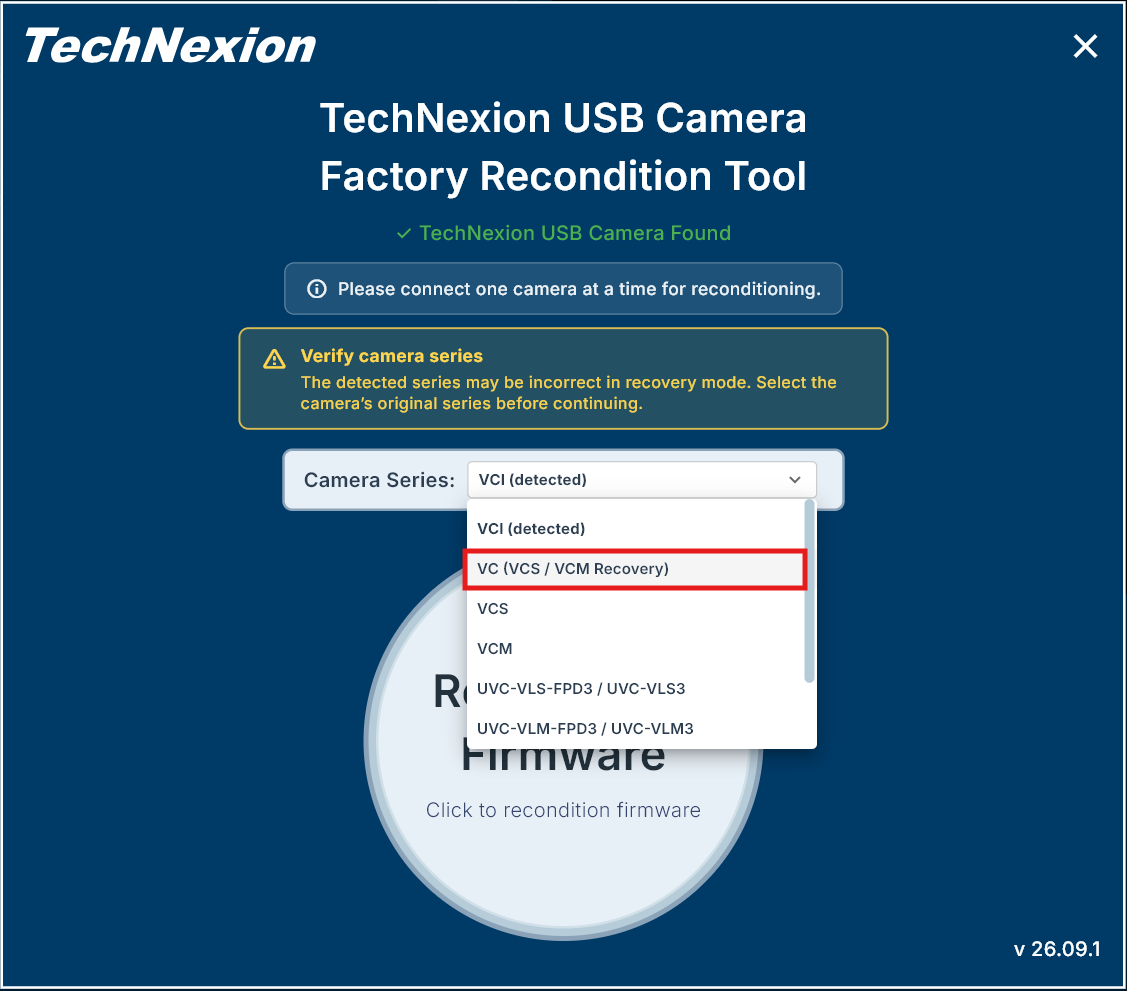
In recovery mode, the detected camera series is only a suggestion and may be incorrect. This is especially important if the wrong firmware was previously installed, because the camera may then appear as a different series.
Before clicking Recondition Firmware:
- Check the model printed on the camera label or the original order information.
- Select the series that matches the camera's original product model.
- Do not rely only on the option marked (detected).
For example, if a VC, VCS, or VCM camera is shown as VC-UnknownBoot or VCI-UnknownBoot, select VC (VCS / VCM Recovery). Select VCI only if the original product is a VCI camera.
If you are unsure which series to select, stop and contact TechNexion Support before continuing. Selecting the wrong series may cause recovery to fail or install the wrong firmware again.
Supported Cameras
| Sensor | USB3 (VCI) | USB3 (VCS, VCM) | USB to FPD-Link III Frame Grabber (UVC-VLS-FPD3) | USB to GMSL2 Frame Grabber (UVC-VLS-GM2, UVC-VLM-GM2) |
|---|---|---|---|---|
| AR0144 | ✓ | ✓ | ✓ | ✓ |
| AR0145 | ✓ | ✓ | ✓ | |
| AR0234 | ✓ | ✓ | ✓ | ✓ |
| AR0235 | ✓ | ✓ | ||
| AR0246 | ✓ | ✓ | ||
| AR0521 | ✓ | ✓ | ✓ | ✓ |
| AR0522 | ✓ | ✓ | ✓ | ✓ |
| AR0544 | ✓ | ✓ | ||
| AR0821 | ✓ | ✓ | ✓ | ✓ |
| AR0822 | ✓ | ✓ | ✓ | ✓ |
| AR0830 | ✓ | ✓ | ||
| AR1335 | ✓ | ✓ | ✓ | ✓ |
| AR2020 | ✓ | ✓ |
Downloads
We recommend using the Recondition Tool built into VizionViewer instead.
Only download the standalone version if you need to use it without VizionViewer.