IMX8MP Camera Usage Guide
Introduction
This guide collects the release, board, demo image, and Yocto build references for TechNexion IMX8MP development kits. It is based on Yocto 5.0 (Scarthgap) 2026Q1 Release with Linux kernel version 6.6.52-2.2.2.
Supported Camera Modules
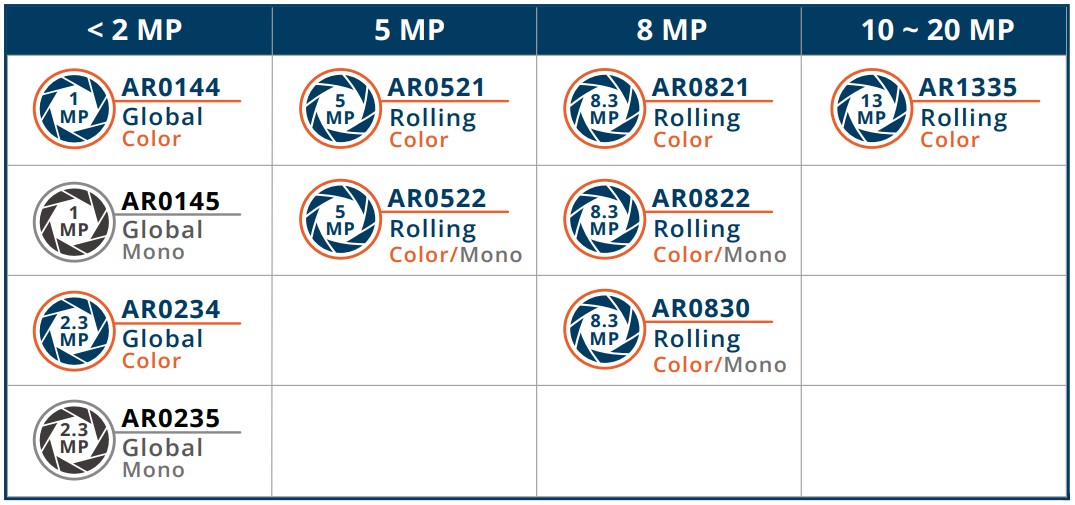
- TEVS Series
- TEVM Series
| Camera Series | Products |
|---|---|
| TEVS | TEVS-AR0144 TEVS-AR0145 TEVS-AR0234 TEVS-AR0235 TEVS-AR0246 TEVS-AR0521 TEVS-AR0522 TEVS-AR0544 TEVS-AR0821 TEVS-AR0822 TEVS-AR0830 TEVS-AR1335 TEVS-AR2020 |
| Camera Series | Products |
|---|---|
| TEVM | TEVM-AR0144 TEVM-AR0145 TEVM-AR0234 TEVM-AR0235 TEVM-AR0246 TEVM-AR0521 TEVM-AR0522 TEVM-AR0544 TEVM-AR0821 TEVM-AR0822 TEVM-AR0830 TEVM-AR1335 TEVM-AR2020 |
Supported Boards
| SoM | Board |
|---|---|
| EDM-G-IMX8M-PLUS | WB-EDM-G-IMX8M-PLUS EDM-G-WIZARD-IMX8M-PLUS |
| AXON-IMX8M-PLUS | AXON-WIZARD-IMX8M-PLUS |
Hardware Setup Instructions
1. Power Supply Preparation
- Use a DC 5V or 12V power cable.
- Use a 12V adapter rated for at least 3A with FPD-Link III SerDes.
- EDM-G-IMX8MP
- AXON-IMX8MP
Connect the power adapter via the barrel jack connector.
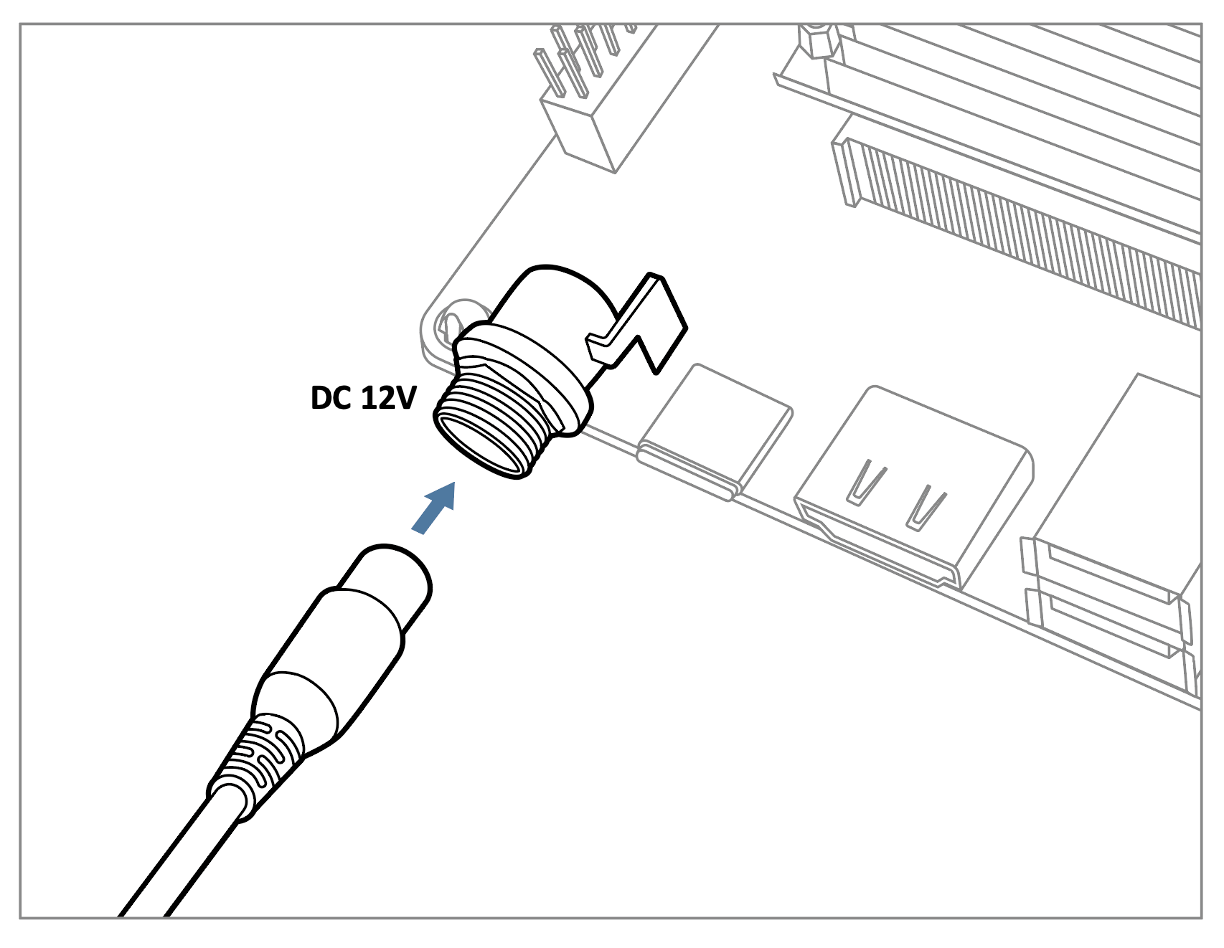
The WB-EDM-G-IMX8M-PLUS can also be powered via USB Type-C (5V).
Connect the power adapter via the 2-row pin header.
The AXON-WIZARD-IMX8M-PLUS can also be powered via USB Type-C (5V).
2. Debug Console Connection
- EDM-G-IMX8MP
- AXON-IMX8MP
- Prepare a USB-to-UART cable when connecting to a PC.
- Connect the cable to the debug console port on the WB-EDM-G-IMX8M-PLUS board.
- Prepare a USB Micro-B to USB-A UART cable when connecting to a PC.
- Connect the cable to the debug console port on the AXON-WIZARD-IMX8M-PLUS board.
3. Display Output Connection
- Prepare a display panel.
- Connect it to the HDMI or LVDS connector on the carrier board.
4. Camera Interface (CSI) Overview
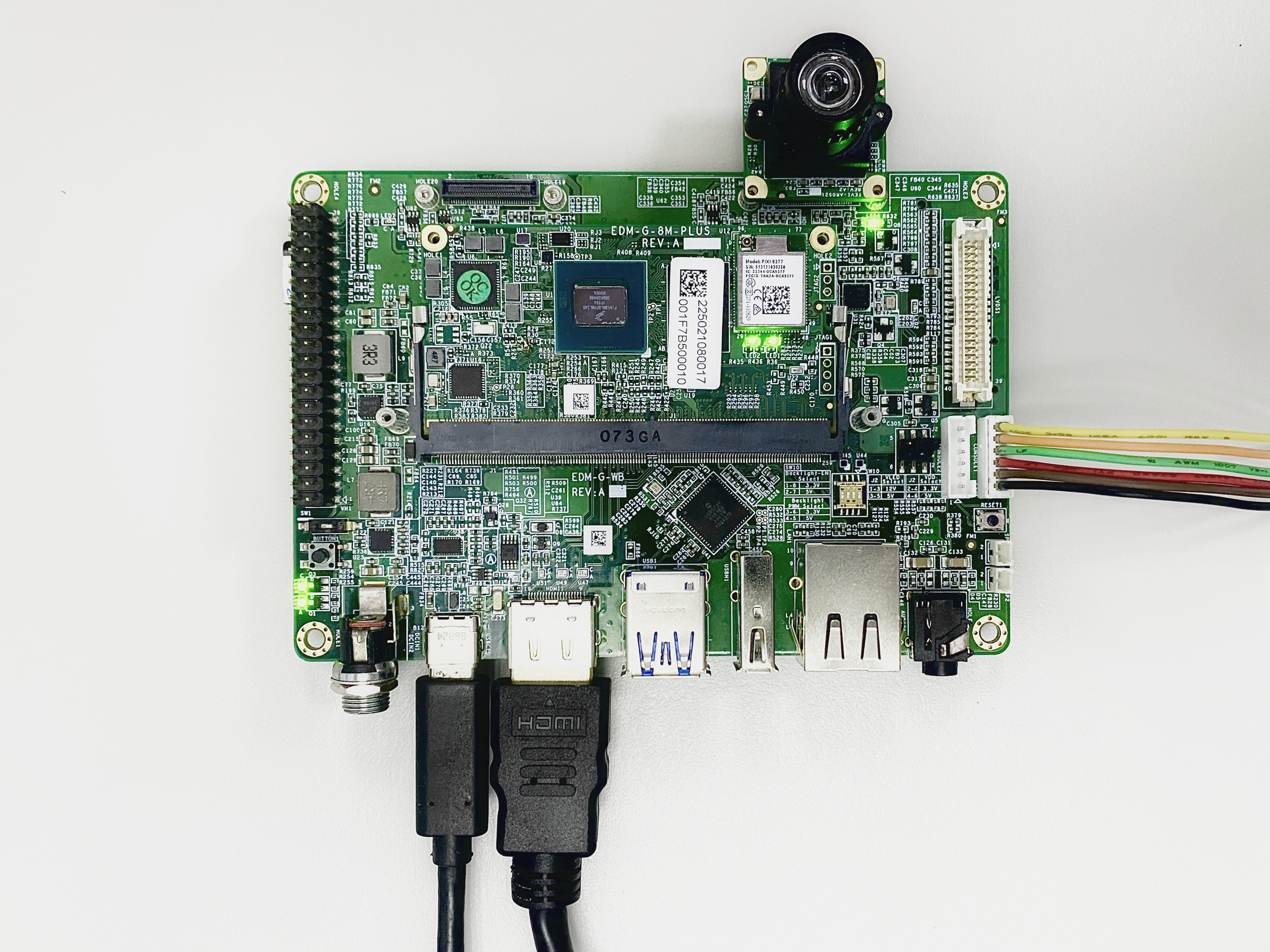
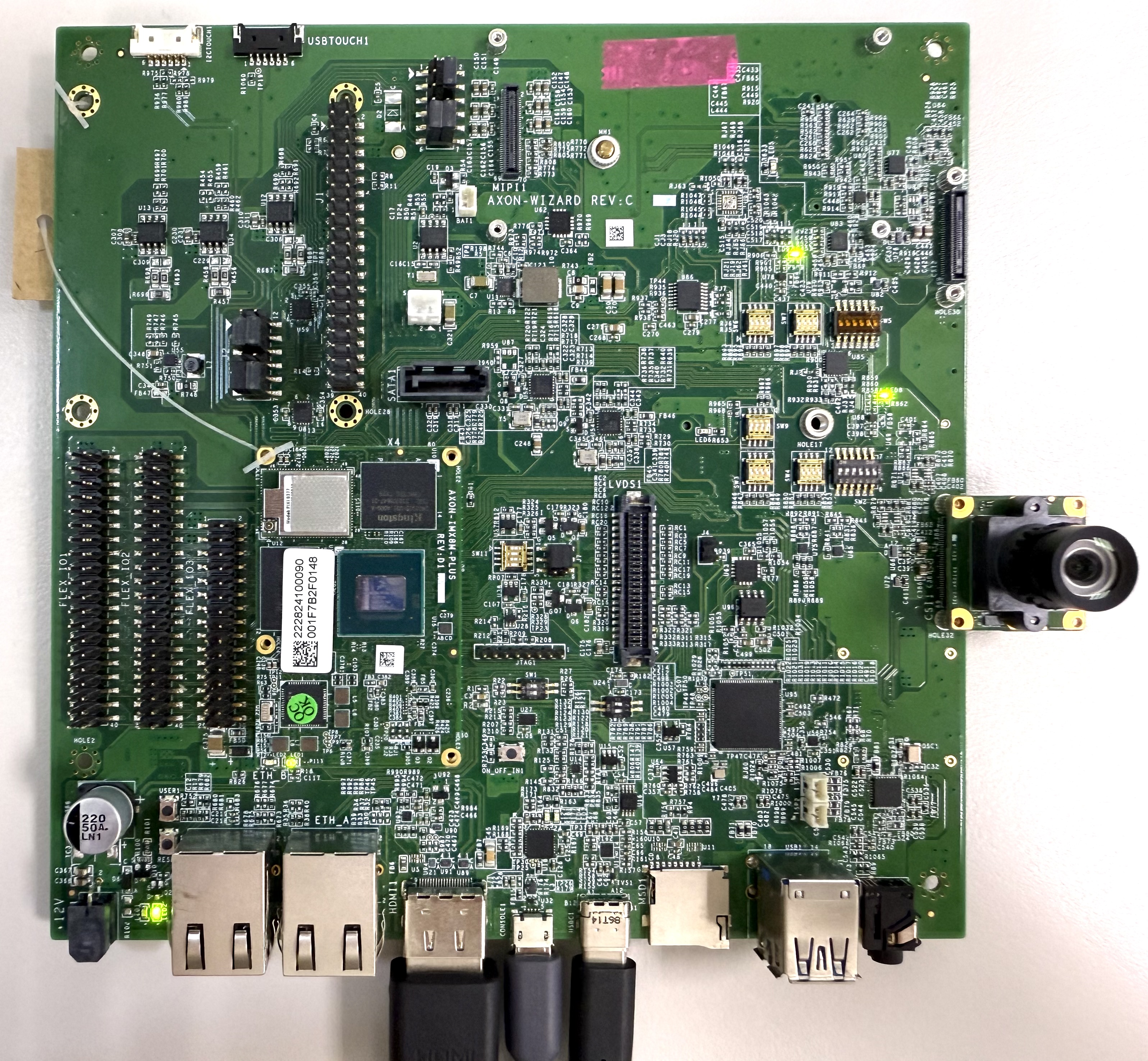
- The boards provide two MIPI CSI-2 interfaces: CSI1 and CSI2.
- The interfaces use 70-pin Hirose board-to-board connectors.
- The examples show a TEVS camera connected to CSI1.
- EDM-G-IMX8MP
- AXON-IMX8MP
Prepare Yocto demo image for testing TechNexion camera
Use a Yocto-based demo image that matches this release before validating the camera.
Downloading the Demo Image
Prebuilt demo images are available on TechNexion's download server.
- EDM-G-IMX8MP
- AXON-IMX8MP
Flashing the Image
Build Yocto
TechNexion supports building a Yocto image with the following kernel and manifest branch.
Supported Linux Kernel
| Linux Kernel Version | Yocto Branch |
|---|---|
| 6.6.52 | tn-imx_6.6.52_2.2.2-next |
Source and Build Instructions
- EDM-G-IMX8MP
- AXON-IMX8MP
Camera Validation Status
Camera setup and capture tests have been verified on IMX8MP development kits with Yocto 5.0 Scarthgap.
Specify Camera DTBO in U-Boot
- Connect the debug console cable to the carrier board.
- Power on the board and interrupt boot when
Hit any key to stop autoboot:appears. - Set the camera overlay:
u-boot=> setenv dtoverlay tevs
u-boot=> saveenv
u-boot=> boot
Validated Software Version
Linux edm-g-imx8mp 6.6.52-2.2.2-next-g8c29c658ea88 #1 SMP PREEMPT Wed Jun 10 02:12:20 UTC 2026 aarch64 GNU/Linux
TechNexion i.MX Release Distro 6.6-scarthgap (scarthgap)
BUILD_ID="20260611133605"
Validation Notes
- The captured media topology shows both TEVS sensor links enabled and immutable, so no manual media link command is required for this validated setup.
- Use /dev/video2 for mxc_isi.0.capture and /dev/video3 for mxc_isi.1.capture. /dev/video0 and /dev/video1 are VPU codec nodes, not camera capture devices.
- Camera capture, display preview, U-Boot configuration, and AXON coverage have been verified for this release.
Capture Device Mapping
| CSI Path | Sensor Entity | Sensor Subdevice | Capture Node |
|---|---|---|---|
| CSI1 / mxc-mipi-csi2.0 | tevs 1-0048 | /dev/v4l-subdev2 | /dev/video2 |
| CSI2 / mxc-mipi-csi2.1 | tevs 4-0048 | /dev/v4l-subdev3 | /dev/video3 |
Check Camera Initialization
  $ dmesg -t | grep tevs
    tevs 4-0048: tevs_probe() device node: tevs@48
    tevs 4-0048: Version:26.3.0.1
    tevs 4-0048: Product:TEVS-AR0821, HeaderVer:3, MIPI_Rate:800
    tevs 4-0048: Chip ID: 0x2557
    tevs 4-0048: probe success
    tevs 1-0048: tevs_probe() device node: tevs@48
    tevs 1-0048: Version:26.6.0.1
    tevs 1-0048: Product:TEVM-AR0144, HeaderVer:3, MIPI_Rate:800
    tevs 1-0048: Chip ID: 0x0356
    tevs 1-0048: probe success
    mx8-img-md: Registered sensor subdevice: tevs 1-0048 (1)
    mx8-img-md: Registered sensor subdevice: tevs 4-0048 (2)
    mx8-img-md: created link [tevs 1-0048] => [mxc-mipi-csi2.0]
    mx8-img-md: created link [tevs 4-0048] => [mxc-mipi-csi2.1]
Check Camera Availability
$ v4l2-ctl --list-device
():
        /dev/v4l-subdev0

():
        /dev/v4l-subdev1

FSL Capture Media Device (platform:32c00000.bus:camera):
        /dev/media0

mxc-isi-cap_v1 (platform:32e00000.isi:cap_devic):
        /dev/video2

mxc-isi-cap_v1 (platform:32e02000.isi:cap_devic):
        /dev/video3

vsi_v4l2dec (platform:vsi_v4l2dec):
        /dev/video1

vsi_v4l2enc (platform:vsi_v4l2enc):
        /dev/video0
Check Media Controller Topology
$ media-ctl -d /dev/media0 -p
Media controller API version 6.6.52

Media device information
------------------------
driver          mxc-md
model           FSL Capture Media Device
bus info        platform:32c00000.bus:camera
driver version  6.6.52

Device topology
- entity 1: mxc_isi.0 (16 pads, 2 links, 0 routes)
        pad0: Sink
                <- "mxc-mipi-csi2.0":4 [ENABLED]
        pad12: Source
                -> "mxc_isi.0.capture":0 [ENABLED]

- entity 18: mxc_isi.0.capture (1 pad, 1 link)
             type Node subtype V4L flags 0
             device node name /dev/video2
        pad0: Sink
                <- "mxc_isi.0":12 [ENABLED]

- entity 22: mxc_isi.1 (16 pads, 2 links, 0 routes)
        pad4: Sink
                <- "mxc-mipi-csi2.1":4 [ENABLED]
        pad12: Source
                -> "mxc_isi.1.capture":0 [ENABLED]

- entity 39: mxc_isi.1.capture (1 pad, 1 link)
             type Node subtype V4L flags 0
             device node name /dev/video3
        pad0: Sink
                <- "mxc_isi.1":12 [ENABLED]

- entity 43: mxc-mipi-csi2.0 (8 pads, 2 links)
             type Node subtype V4L flags 0
             device node name /dev/v4l-subdev0
        pad0: Sink
                <- "tevs 1-0048":0 [ENABLED,IMMUTABLE]
        pad4: Source
                -> "mxc_isi.0":0 [ENABLED]

- entity 52: mxc-mipi-csi2.1 (8 pads, 2 links)
             type Node subtype V4L flags 0
             device node name /dev/v4l-subdev1
        pad0: Sink
                <- "tevs 4-0048":0 [ENABLED,IMMUTABLE]
        pad4: Source
                -> "mxc_isi.1":4 [ENABLED]

- entity 61: tevs 1-0048 (1 pad, 1 link, 0 routes)
             type V4L2 subdev subtype Sensor flags 0
             device node name /dev/v4l-subdev2
        pad0: Source
                [stream:0 fmt:UYVY8_1X16/640x480@1/60 field:none colorspace:srgb xfer:srgb ycbcr:601 quantization:full-range]
                -> "mxc-mipi-csi2.0":0 [ENABLED,IMMUTABLE]

- entity 63: tevs 4-0048 (1 pad, 1 link, 0 routes)
             type V4L2 subdev subtype Sensor flags 0
             device node name /dev/v4l-subdev3
        pad0: Source
                [stream:0 fmt:UYVY8_1X16/640x480@1/60 field:none colorspace:srgb xfer:srgb ycbcr:601 quantization:full-range]
                -> "mxc-mipi-csi2.1":0 [ENABLED,IMMUTABLE]
Run a GStreamer Capture Test
Use these commands to verify capture without requiring a display output.
- CSI1 capture path
- CSI2 capture path
$ gst-launch-1.0 -v v4l2src device=/dev/video2 num-buffers=30 ! \
  'video/x-raw,width=1280,height=720' ! \
  fakesink sync=false
$ gst-launch-1.0 -v v4l2src device=/dev/video3 num-buffers=30 ! \
  'video/x-raw,width=1280,height=720' ! \
  fakesink sync=false